
How to use Discord in a corporate environment?
How Zappts' journey with Discord went, from choosing the platform to automation with Webhooks and Bots.
15 de dezembro de 2021
In November 2021, Zappts held the Digital Products Month, with several online lectures and free training sessions. One of the topics covered during this month was “How to use Discord in a corporate environment?”, in a lecture given by Thauany Moedano, Head of Development, here at the company.
This text was developed based on everything that was explored during the event.
For those who want to follow the video, the recording is available below:
Did you know that Zappts uses Discord as its main means of internal communication? Yes! Today we’re going to talk a little bit about how this journey went, why we chose this platform, how our experience has been, and some tools we use within our server (webhooks, bots).
But what exactly is Discord?
Discord is an IP-based voice tool with audio and text channels. It was launched in 2015 and has versions for virtually all platforms, whether app or web. It emerged with its main target audience being the gaming community, with the goal of facilitating communication between players by creating servers where they can chat with friends and other gamers. Currently, Discord’s branding works for any type of community, whether gamer or not. They even partnered with GitHub, focusing on IT professionals.
Discord is server-oriented, and these are separate places where you can organize your own community according to your topics of interest. It is also possible to have voice and text channels, as well as some moderation tools that make it possible to list who does what within the server. And of course, we also have bots, lots of bots!
What are bots?
Basically, they are robot users that we can invite or create within the server, and they offer various extra functionalities. Interaction with them is done through commands.
There are moderation bots, music bots, bots that improve checklists, reminder bots, and many other functionalities that enhance a server.
And how was our corporate journey with Discord?
It all started in March 2020, with the beginning of the coronavirus pandemic. Like all companies, we went through that period where everyone should work from home, and we didn’t know how we would adapt our internal communication. We had about 30 employees at the time.
We held a meeting with everyone at the company and discussed how this new work model would be. We opened a vote for people to suggest which communication tool we could use, since we didn’t have a standard, and that’s when the idea of Discord came up.
The first moves
In the beginning, our server’s organization reflected the Zappts office layout. So, just like our headquarters, we had rooms named after big techs: Facebook room, Youtube, Microsoft, etc. And the people who were in those rooms used the audio channels of each. We tried to transport as much as possible the experience we had in person to the 100% virtual environment.
Thinking about that, we created the #hello-goodbye text channel, where people informed their availability (good morning, lunch, leaving…), as well as a parallel server called relax & fun, just for Zappters to have fun, talk about movies, series, memes.
Organization
As the company grew (today we have more than 100 employees, 3 times more than at the beginning of the pandemic), the server’s organization became larger than our headquarters and we realized that this structure would no longer be as functional, it could no longer reflect the Zappts headquarters. We reformulated our channels, and they started to reflect the squads. This way, all new employees could find their way within Discord.
Our parallel server was discontinued, and on the main server, we created the #random channel, where people could feel free to share about any topic.
We also started using specific channels for announcements with writing moderated by roles, where only certain people are authorized to write company communications.
With our exponential growth, we started asking ourselves: how can we improve? Can we go beyond our server?
That’s when we felt the need for new tools for our Discord server. We needed to automate some announcements, such as:
- Workplace gymnastics
- Weekly meetings
- Birthday celebrations of the day
- Zappters’ time at the company
With the need to save time, our story with Webhooks was born.
And what are Webhooks?
A Webhook is nothing more than a way for you to integrate applications through an API. Basically, it allows me, through an API, to post messages on a specific channel.
This post can be a text message, can contain images and several other features, and its use can automate some processes on the Discord channel.
How to configure the Webhook?
To get started, access your server’s options/settings. In integrations, create a new Webhook and choose which channel it will post to. Each Webhook can post to only one channel, and you can change its name and avatar. Save the changes and copy the provided URL.
For the second step, you will need a program called Postman. This is an app developed to interact with APIs easily.
After installing the program, paste the Webhook URL that Discord provided. In the request body, there are several tools that can be used (here you can find some of them [link]), but the main one is the content. This is nothing more than what you would like to post on your channel.
Write the message and click post.
It’s simple! Zappts’ Webhook works exactly this way.
How can we automate Webhook posts on Discord?
We created a fully cloud structure and another fully serverless. The latter, as the name itself says, is a serverless architecture, because we don’t actively manage any servers. AWS, which was the cloud we chose to host this entire architecture, is responsible for managing the necessary infrastructure.
On AWS, we have a service called Cloud Watch. This is a service that contains several things, and one of them is alarms. They allow event scheduling and, once the date arrives, they call a function to do some processing that we want.
For each post that our Webhook makes, we have an alarm configured. So, every day, at a certain time, the alarms call the functions, which are serverless, and they make the posts.
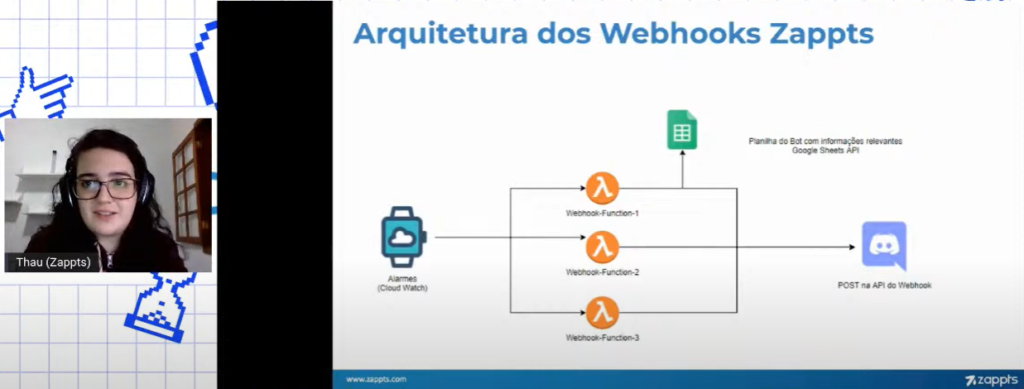
The automated data from these posts (birthdays, meetings, time at the company, etc.) comes from integration with our spreadsheets filled with this information.
One of the biggest advantages we saw in using this architecture was that, with little effort, we gained a lot. Posts are made automatically and we don’t lose interaction with people within the Discord channels.
Webhook Personalization
Above, we talked about the possibility of changing your Webhook’s name and avatar when it is created. This way, when automated posts are made, the sent message simulates a BOT user posting.
From that, we opened it up so that Zappters could choose via voting the name and images for our BOT user.
That’s how Cleiton was born!
What are our ideas for the future?
Our story with Discord doesn’t end here. We still have some dreams to be realized very soon.
- Auto roles: autonomy for the employee to choose their role according to the stack and project;
- Cleiton as a Bot: an active BOT that could respond to commands allowing advanced functions with a FAQ, onboarding DMs, etc;
- Zappters Employees, do they know things?: Webhook for sending questions for squads to answer and work on hard skills;
Discord + Zappts = match?
The big summary we had in the end was:
- We had many benefits and usability for a free tool;
- Client receptivity: some even created their own servers;
- The recent threads feature helped solve problems of last conversations happening in the same chat.
We also had some limitations such as: text size, maximum file upload size, broadcast quality and, although the effort to improve is visible, the platform still has accessibility flaws.
Therefore, the answer to this question is: it depends.
For our current size and culture, it works perfectly. But, each case is a case and needs to be analyzed separately.
Share this article
Related articles

16 set 2026
The End of Passive SaaS: Why You’ll Pay for Outcomes, Not Seats
The traditional software pricing model based on per-user licenses (seat-based SaaS) faces an inevitable decline in 2026.

09 set 2026
The Timid Autonomy Dilemma: Why Keeping AI in a Suggestion-Only Role Is Killing Your Margins
This article analyzes the financial impact of this "timid autonomy" and advocates for an urgent shift to the "Human-on-the-loop" (HOTL) model.

02 set 2026
The "SaaSocalypse" is actually an architecture and identity crisis.
This article reverse-engineers a real-world success story (anonymized) from the financial sector, dissecting the layers of...