Continuous integration, flexibility, and efficient history cleanup: meet Z-Flow and boost your development team’s productivity!
By Thauany Moedano – Cloud Architect and Back-End Software Developer at Zappts
Today’s topic here on the blog is Git Workflow and I’m going to present a little about the Z-Flow solution, developed by Zappts. Let’s go?
Well, when we talk about teamwork in a development team, we can’t fail to mention the use of a versioning tool.
Our friend git is probably one of the first code versioning systems that every developer encounters when they start working in a team, and even though git is incredibly powerful and very useful, there’s still a lot of discussion about how to use it.
So, if you have this question, keep reading this article because I’m going to share some important information about the subject with you!
Git Workflow
What is the best way to work with git? How do I organize the branches?
These questions led to the creation of workflows, and it’s through them that we can find the answers we’re looking for.
A workflow is a framework for organizing branches.
The workflow dictates how branches should be organized and named, and what movements should be made until the final product delivery.
There are several known models and you’ve probably come across some of them.
But, with so many frameworks already available and known, why create a new workflow?
First, it’s important to highlight that older models don’t take into account our current scenario of continuous integration and delivery (those famous words: CI/CD).
And the newer models, like “GitHub Flow” or “Feature Branch Workflow“?
Indeed, they are great for CI/CD (we even base ourselves on some basic concepts of GitHub Flow). However, they present a very polluted master branch and homolog (or release in some projects), and sometimes with tens or hundreds of thousands of commits, making it impossible for any expert to understand what the delivery sequence was.
This enormous amount of commits end up serving no purpose (except to confuse), in addition to making the rollback process very complex (for anyone who hasn’t been through it, you don’t want to know what it’s like to have to do git revert and revert of revert to get things back in order).
Here at Zappts, we’ve encountered this situation many times in our own projects and also in client projects. That’s why we thought of a new way to organize how to deliver functionality to production.
Z-Flow – The Zappts Git Workflow Solution
Here we go: everything we do when working in software development is focused on quality deliveries, right?
Based on this premise, we created a workflow model that would leave our development branch with all the commits made by developers (they are important there), and our production branch with the delivery history and not the development commits, also allowing the administration of deploys by specific deliveries and not as a whole.
That’s how Z-Flow was born!
What do I need to know to get the most out of this article?
So that you’re on the same page as us and can follow the pains we went through before deciding to think about Z-Flow, it would be important for you to know about:
- Git: that you’ve already worked on a project that uses git as a code versioning system. If you’ve already been through the pain of managing a git with many developers, a large project, code that “disappeared from nowhere” from your branch, even better.
- GitFlow: is based on the premise that all feature branches come from Dev. In other words, Dev needs to be stable with all the features that will be published to homologation and later production.
- GitHub Flow: is based on the premise that all feature branches come from Master and that all feature branches can be merged into master separately. Usually, in larger projects, there are intermediate branches (all from master), which individually receive the feature branch.
- Continuous Delivery (CI/CD): using branch commits as source to run an automatic publishing pipeline. When a commit is submitted (pushed) to a branch, a script is automatically executed that publishes the new code to a specific environment.
Attention: if you work in software development, come join our team! Check out the job openings and submit your resume today!
Introducing Z-Flow
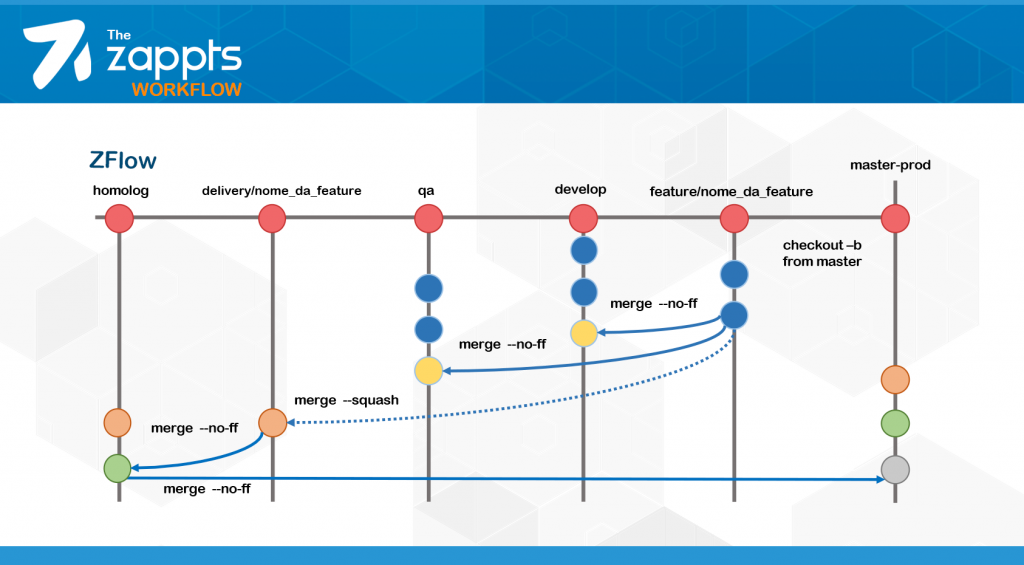
As mentioned earlier, if you implement Z-Flow in your project, you’ll have a VERY clean production branch, containing only the delivery history and following the chronological delivery of each feature, plus a development branch that has all the commit histories made by all developers.
Main branches
Z-Flow has four main branches:
- master
- develop
- qa
- homolog
The master is the production branch and always represents a stable version of our software.
As for develop, this is where new features accumulate and the development team has visibility into which features have already been implemented by other developers.
Because the develop branch is updated frequently, it’s the branch most susceptible to instabilities.
Now, let’s introduce two new branches that you might not know yet: qa and homolog.
The qa branch is dedicated to the quality team. It’s where the quality team’s tests are executed.
The qa branch is more stable than the develop branch, since developers must ensure the stability of their feature before passing it to the testing phase.
p.s: the qa branch is recommended, but not required for Z-Flow to work as we envisioned. If you have a small team or project, this branch might be dispensable.
And finally, we have the homolog branch, where all features tested by the QA team are, but still need to be homologated by the business team. This is the branch that delivers features to production.
Important: in some specific project cases, it’s necessary to include a Pre-Prod branch after homolog. This case will be addressed later.
Z-Flow – Transitioning between branches
So that development happens in a parallel and efficient way, we use secondary branches. They are:
- feature branch
- delivery branch
Remembering that for each feature developed, we’ll have a feature branch and a delivery branch.
For all transitions between branches, whether main or secondary, we recommend following git best practices, at least using tools that support merge via Pull Request and designating independent users to do code review for each Pull Request.
Feature Branch
Derives from: master
Receives content from: commits made by the feature developers
Delivers its content to: develop (–no-ff), qa (–no-ff)
Convention: feature/*
The feature branch is where the developer incorporates new system functionalities.
It always derives from master to ensure we’re working on top of a stable production version.
All feature implementations must be done on the feature branch, never directly on develop or any other branch.
Once development is finalized, the feature must be delivered (merged) in no-fast-forward mode on develop so the developer can perform integrated testing with other functionalities incorporated by other teams.
After making all implementations and changes on the feature branch and ensuring feature stability on develop, the developer can merge the feature branch in no-fast-forward mode on the qa branch to start the testing phase. Therefore, our flow looks like this:
git checkout master
git pull origin master
git checkout -b feature/my-feature

**after implementing changes (git commits):
git checkout develop
git pull origin develop
git merge --no-ff feature/my-feature
git push origin develop

**when the feature is ready for testing:
git checkout qa
git pull origin qa
git merge --no-ff feature/my-feature
git push origin qa
Delivery Branch
Derives from: master
Receives content from: feature branch (–squash)
Delivers its content to: homolog (–no-ff)
Convention: delivery/*
In order to clean the commit history, the delivery branch serves to reduce the commit history of a feature branch ready for delivery.
Think of the delivery branch as exactly the feature branch, with the minimum possible commits — the commits related to each “delivery” of the feature.
To achieve this goal, the delivery branch receives the squash merge of its equivalent feature branch after the feature is approved in QA.
Thus, the delivery branch has the same content as the feature branch (master + new functionality), but with only one commit (the result of the squash merge).
Here’s our flow:
git checkout master
git pull origin master
git checkout -b delivery/my-feature
git merge --squash feature/my-feature
git commit -m "delivery of feature my-feature"
Homolog Branch
Derives from: master
Receives content from: delivery branch (–no-ff)
Delivers its content to: master (–no-ff)
The homolog branch will receive all features that are tested and ready to be homologated.
To deliver the content of each feature ready to be homologated to homolog, the delivery branch (related to each feature) will be merged into homolog.
The merge here happens in “no-ff” mode so that a delivery history of the feature for homologation is created. So, pay attention: it’s the delivery branch that must be delivered for homologation.
p.s: the homolog branch only has the commits related to each feature delivery made for homologation. By using Z-Flow, you have on the homolog branch a clean history of all feature deliveries for homologation!
git checkout homolog
git pull origin homolog
git merge --no-ff delivery/my-feature
git push origin homolog
Master Branch
Receives content from: homolog (–no-ff)
Delivers its content to: creation of new feature branches and delivery branches
And when are features delivered to master?
For this flow, we consider a delivery to production as exactly what is homologated.
Thus, when the right moment comes, the master branch needs to be a “copy” of the homolog branch.
When a set of features is homologated, just merge in “no-ff” mode from homolog to master to update it, making master a new stable version.
git checkout master
git pull origin master
git merge --no-ff homolog
git push origin master
Thus, we can tag the latest stable version each time we deliver a set of features.
p.s. 1: when it’s necessary to have a “pre-prod” branch, follow the steps described here as ‘master’. After pre-prod is validated, follow the same steps again replacing “homolog” with “pre-prod”.
p.s 2: the master branch only has the commits related to each feature delivery made for homologation. By using Z-Flow, you have on the master branch a clean history of all feature deliveries for homologation together with a history of all deliveries made to production.
Why do we need a delivery branch?
But why do we need to create an extra branch if we could simply squash merge the feature directly into homolog?
Indeed, this can be done, making the flow much simpler. So, what’s the reason for the delivery branch to exist?
At Zappts, we value code review a lot and it’s always important for someone to approve our code before we submit it to one of the main branches.
When using squash merge, due to the way code review tools use git diff, it becomes very difficult to understand the differences between one commit and another.
Therefore, the purpose of creating an intermediate branch, only to create a squash merge (a single commit) from the feature branch, is to not disrupt code review between other branches.
The process is indeed a bit more laborious, but the effort pays off: for a small cost (5 git commands), you get an enormous return (immeasurable in some projects) of having clean homolog and master branches, with few commits chronologically organized in the form of deliveries.
We would pay double (or more) for this result.
Dealing with Errors
How to handle it in Z-Flow when our feature has errors?
The rule is simple: errors found locally (feature) or in the develop and qa branches are fixed on the feature branch and delivered again to develop and qa.
If the error was caught on the homolog branch, it must be fixed on the feature branch, replicated (squashed) to the delivery branch and delivered again to homolog.
It’s understood that the delivery branch will have a few extra commits (the first delivery and the second delivery with the error fixed). That’s exactly what we’re looking for: a clean delivery history.
And when we find an error that’s already in production? In this case, we create a specific branch to handle the error, called hotfix.
Hotfix Branch
Derives from: master
Delivers content to: delivery/hotfix (–squash)
Convention: hotfix/*
The hotfix branch should follow the same flow already presented in the feature branch, only changing the naming convention. In this case:
git checkout master
git pull origin master
git checkout -b hotfix/my-hotfix

after implementing changes (git commits):
git checkout develop
git pull origin develop
git merge --no-ff hotfix/my-hotfix
git push origin develop

**after ensuring hotfix stability:
git checkout qa
git pull origin qa
git merge --no-ff hotfix/my-hotfix
git push origin qa
And just as there’s a delivery branch for a feature branch, for hotfix there’s also a delivery hotfix branch.
Delivery Hotfix Branch
Derives from: master
Receives content from: hotfix (–squash)
Delivers content to: homolog (–no-ff)
Convention: delivery/hotfix/*
And the flow also follows the same as a delivery branch, only changing the naming convention:
git checkout master
git pull origin master
git checkout -b delivery/hotfix/my-hotfix
git merge --squash hotfix/my-hotfix
git commit -m "delivery of hotfix my-hotfix"
git push origin delivery/hotfix/my-hotfix
It’s worth noting that due to the urgency that a hotfix may present, it’s possible to skip steps in Z-Flow and deliver a hotfix directly to qa or create a delivery branch directly for delivery to homolog/master.
Continuous Integration and Continuous Deployment
Z-Flow guarantees continuous integration since branches are incorporated together in all main branches.
With Z-Flow, integrated features are always being tested against each other. When passing through the qa branch, Z-Flow guarantees that a new feature doesn’t break the others already delivered to production on the master branch.
There are cases where it’s necessary to deliver features promptly or before a set of functionalities. In these cases, some Z-Flow steps can be skipped and the delivery branch can be merged directly into master, since the delivery branch already derives from master.
This guarantees that all delivery branches always contain: master (stable production environment) + feature (new functionality).
Therefore, Z-Flow is a flexible model that allows both the delivery of an integrated set of features or the division of deliveries into separate packages.
More Stable Production Branch
Since the feature branch must go through the develop and qa branches (and is intensely tested), it’s unlikely that the production branch will become unstable.
This is because only features that already contain tested and ready master are delivered to production.
In other words, the scenario of master + new implementation is already simulated and tested since develop and qa.
Cleaner History
Since the delivery branch is always a squash of a feature branch and it’s delivered to homolog and master, Z-Flow guarantees that on final branches the commit history will be much cleaner, considering a delivery history rather than a development history.
Using delivery branches, it’s easy to understand the delivery chronology, since each delivery branch is generally composed of two commits (one commit for the implementation and one commit for the merge).
And since you’ve made it this far with us, you must be interested in knowing how Z-Flow works in practice, right? So, let’s go!
Check out the image below for an example of how the history becomes cleaner and clearer about deliveries on the homolog and master branches, and how the history is complete with all development commits on the develop and qa branches, fulfilling the main objectives of Z-Flow.
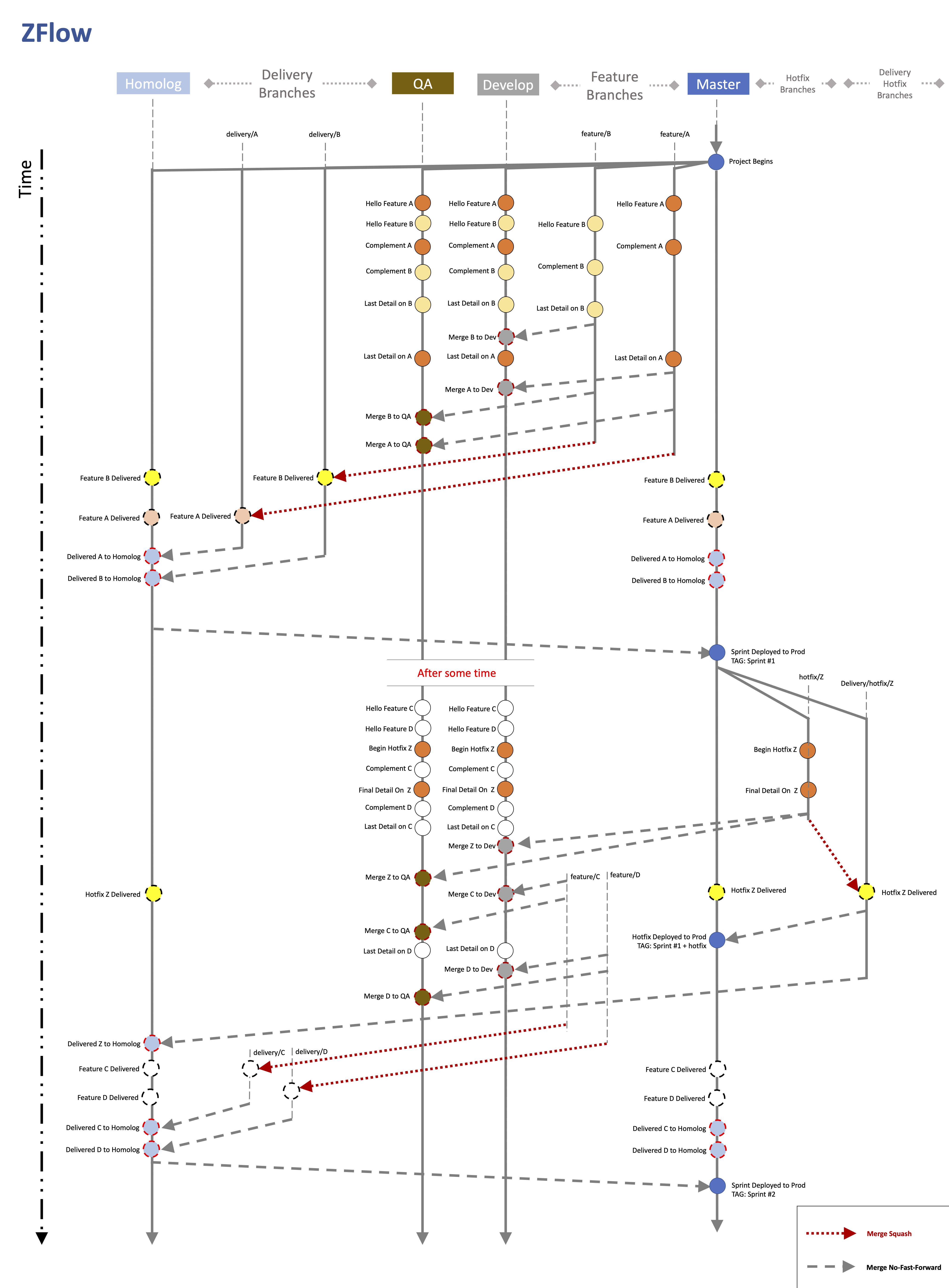
There are two ways to analyze this image:
1. Focused on branches: analyze only the branches, from top to bottom, ignoring the branches on the side. See how the commit history of a single branch looks. Understand what happened with the branch, from an evolutionary perspective. Remember to look with a developer’s perspective for the develop and qa branches and with a business perspective for the homolog and master branches.
2. Focused on the flow: follow the merge flow. When the merge is no-ff type, it drags the commit history from the source branch. When the merge is squash type, it summarizes all commits from the branch into a single commit.
Conclusion
Z-Flow is an alternative to workflow models. It brings flexibility and guarantees CI/CD while cleaning the commit history, in addition to keeping a stable production branch.
So, ready to add Z-Flow to your workflow catalog? Ready to use Z-Flow in your project?
If your company needs help structuring development processes, count on us! We’ll accelerate your results with productive solutions like Z-Flow. Talk to our specialists right now!
And if you’re a developer, check this out: how about coming to work at Zappts?
Here, you’ll find the BEST environment to develop your skills, expose ideas, and learn lots of cool things.
We’ve built an incredible space for work and fun, that respects diversity and provides conditions for everyone to leave their mark on our history!
Come check out the job openings, work and learn with us: https://zappts.com/trabalhe-conosco/
Until the next article

Share this article
Related articles

16 set 2026
The End of Passive SaaS: Why You’ll Pay for Outcomes, Not Seats
The traditional software pricing model based on per-user licenses (seat-based SaaS) faces an inevitable decline in 2026.

09 set 2026
The Timid Autonomy Dilemma: Why Keeping AI in a Suggestion-Only Role Is Killing Your Margins
This article analyzes the financial impact of this "timid autonomy" and advocates for an urgent shift to the "Human-on-the-loop" (HOTL) model.

02 set 2026
The "SaaSocalypse" is actually an architecture and identity crisis.
This article reverse-engineers a real-world success story (anonymized) from the financial sector, dissecting the layers of...