
What is Infra as Code
Cloud resource provisioning is part of companies' day-to-day operations.
2 de março de 2022

First of all, do you know what Infra as Code is?
Well, the use of computing has indeed become more popular every year. More and more companies use the cloud to host the most diverse types of applications. You’ve probably heard of DevOps and SRE, areas that complement and talk to each other, and among the many tasks such a team might have is maintaining a cloud environment.
Now, think about how much time is burdened from the team responsible for taking care of cloud resources.
Every time a new project starts, the team needs to: define the resources, define the parameters of each resource, create all the resources and replicate the resources for N environments. If something goes wrong along the way, the work is greater. It is necessary to delete the resource and redo it. The same applies during development where new resources may be necessary.
Initially, the process of creating and maintaining an infrastructure can be very painful if done entirely manually. Based on this, a new concept emerged to automate this task and bring some benefits.
This concept is called Infrastructure as Code (IaC).
What is Infrastructure as Code (IaC) anyway?
Infra as Code uses a high-level language (usually following the .json or .yaml pattern) to describe the characteristics of each resource we want to create in our cloud. These files are usually called templates.
Notice the change: instead of creating the infrastructure entirely manually, you now have a script informing which resources and parameters are necessary to create that environment.
The interesting part is that, as we now have the information in a file, it can be versioned in a git repository for example, allowing some views that were not possible before: history of changes to that infrastructure and the possibility of allocating a group of people to review changes without having to follow a manual process.
What other advantages does Infrastructure as Code (IaC) provide?
Environment standardization and parameterization
Remember that before, in a manual process, it was necessary to repeat all steps for N environments of that application that were to be created?
Bringing this configuration to a script, it is possible to parameterize it so that, by changing some inputs, it is possible to replicate environments in a simple way.
For example, imagine that you need to create a development environment and a production environment. You can use the same script and change some parameters such as the number of server processors to meet the specifics of each environment.
The fun gets even more interesting with the possibility of using conditions for resource creation. Do you need to create an extra resource if it’s in production? No problem: just add a condition to create that resource only if the environment parameter is production.
Rule configuration
Do you need to prevent your team from creating certain types of resources? That’s fine!
With Infra as Code it is possible to put automatic validation rules in the environment, whether through pipelines or the tool’s own capability. Automatically, your template can be validated to follow the project’s standards.
History and versioning
As we already mentioned, using Infra as Code allows you to version files using a tool like git, allowing you to maintain a history of changes to that template.
It is possible to locate the date and time when a certain template was changed, which can help a lot in troubleshooting when provisioned resources do not act as expected. Why did it work before and not anymore? What changed in the infrastructure of that resource? Now with Infra as Code it is possible to have clues and visibility of resource changes.
Process agility
Just as a developer can reuse code in their application, the same can be done with scripts.
Once you develop scripts for a type of resource, you can reuse the code and speed up the creation of new environments using previously created scripts.
I understand the concept. But which tools allow the use of Infra as Code?
Let’s learn about the most used tools:
Terraform: Terraform is one of the most popular tools in Infra as Code precisely because it is cloud-agnostic. What does that mean? That the template created by terraform can be used to create environments in both AWS and Google or other providers that Terraform supports. This format is interesting because your application doesn’t get “vendor locked”, that is, it is not tied to the cloud provider.
Cloud provider tools:
These three tools are each provider’s own services for provisioning resources in their clouds. The advantage of using them is that as they are native services, they can be easily integrated with other services from the cloud provider.
Ansible is Red Hat’s tool, focused on orchestration and automation of deployments across multiple machines and complex environments. It is also possible to automate the configuration of machines such as package installation and software updates.
Puppet and Chef are two similar tools, with a greater focus on system configuration. With both tools you can automate configuration, maintenance and update processes of servers using Infra as Code.
That is, regardless of the tool, your team will gain agility and productivity by automating tasks that were previously manual.
Impact of Infra as Code on the market
Using Infra as Code aligns with topics that Gartner lists as trends.
Cloud Native applications, that is, those born in the cloud, are increasingly common nowadays and accelerate the process of creating MVPs and Go To Market. Infra as Code speeds up the creation of native resources in the cloud, making product development even more productive, with full focus on application creation.
Hyperautomation is also a trend where companies seek to automate as many IT processes as possible. Infra as Code is one of the tools that can help in this process.
The culture of Infra as Code is already part of Zappts’ culture, where Cloud Native projects with infrastructure created by us always contemplate the use of infrastructure templates. Thus, taking advantage of the benefit of script reuse, Zappts maintains a public repository with Cloud Formation templates. In this repository we find several usable template patterns.
In addition, the repository also has very nice documentation explaining how to use some examples and even some specific properties of Cloud Formation. Check out the repository: https://github.com/zappts/zappts_cfn_templates.
An example: Cloud Formation
Cloud Formation is one of the most popular Infra as Code tools, as we already mentioned.
Thanks to the success of the cloud provider behind it, AWS.
So, let’s better understand how Infra as Code works in practice by learning some Cloud Formation concepts.
Cloud Formation Structure:
A Cloud Formation document can be structured in .yaml or .json. In this example we will see a structure in .yaml.
Initially, Cloud Formation has its structure divided into:
Header
Indicates the format version you are using and also a general description of the template.
Cloud Formation allows application of transformations: that is, it is possible to change the Cloud Formation syntax through the use of macros. This concept is more advanced and will not be covered here, however, it is important to know that one of the most used transformations is that of the Serverless Framework, which simplifies the syntax of some Serverless resources.
If you don’t yet know the concept of Serverless, you can learn more by checking out our article.

Parameters
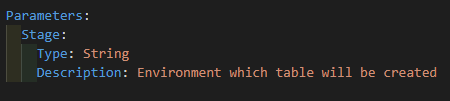
Parameters, as the name suggests, are the parameters to define the characteristics of the resources in that template.
For example, we can define by parameter the processing capacity of a machine described in a template.
Thus, we have the necessary processing capacity information at the deploy time of the template.
Conditions
We use this property to define conditions for creating certain resources or which value to use for resource properties. Therefore, it is possible to combine conditions and use AND and OR for more complex conditions.
A very interesting example is: activate automatic backup of a table only if the environment is production. Notice that here we are using both the parameters and conditions concepts.
In this case, I specify the parameters environment to define whether it is a template for development or production and the condition to determine whether I create an automatic backup or not.
Resources
These are the resources themselves.
Each resource has its own properties. We can view these properties in the Cloud Formation documentation.
Thus, the documentation is fundamental to know which attributes to put in each property and how to create each resource.
Outputs
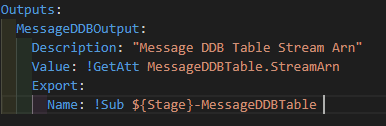
Outputs are a Cloud Formation tool used to export property values of resources and make them globally visible to other templates.
For example, imagine that you have a template only for creating DynamoDB database tables. DynamoDB has a property called Stream, which serves to stream changes that occurred in that table.
Thus, this stream can trigger a lambda function to do some processing reacting to this event.
Now, let’s suppose you want to link the stream of this table to a lambda that is in another template. The lambda requires that you pass the stream identifier (also known as ARN – Amazon Resource Name) in one of the properties, however, this name is not available until you create the template.
Thus, for examples like this, you can export this name as an output of the template and use the exported variable in another.
It is important to use the Outputs resource carefully because they tie templates together!
This means that you cannot delete a resource if it is being referenced by another resource. Therefore, only use in extremely necessary cases.
Intrinsic Functions
Intrinsic functions are built-in functions of Cloud Formation. These functions allow referencing resource properties, that is, their values, which are not actually available until the template is created.
Next, let’s get to know some of them?
The Ref is used to reference the logical value of the resource. So, it usually represents the id, name or unique identifier of the resource.
The GetAtt allows us to access some other attributes of the resource that are not defined in the Ref. Thus, each resource has its own set of attributes available for access.
The Sub allows using variable names (the parameters) within resources. Thus, Cloud Formation recognizes that the name should be replaced by the variable informed in the parameter.
Finally, you can check the documentation for each of them here.
Now, let’s see a practical example of applying these concepts? Let’s go to the use case:
- We need to create a DynamoDB table (AWS non-relational database) with the name ‘{environment}_messages’. The primary key of this table is the message ID. The table must be created for all environments and, for production, must have backup (point in time recovery) enabled. Additionally, the table must have a stream (event when an item is inserted, modified or deleted) and this stream must be used by existing functions that are in another template.
Thus, see how the template for this example would look:
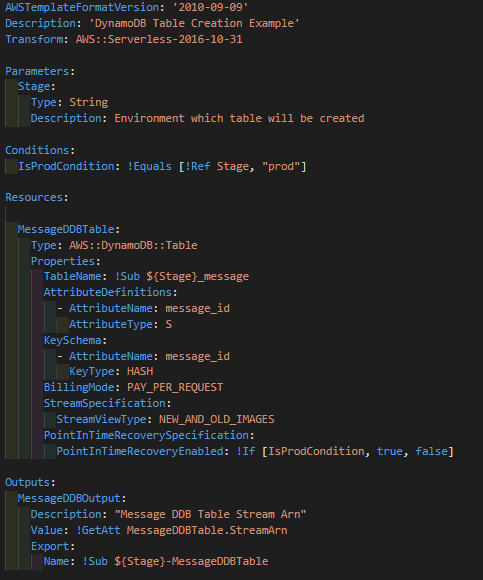
So, think how interesting: With few modifications you would have new templates for other types of DynamoDB tables. As a result, that’s the magic and benefit of using Infra as Code!
How to make it even easier:
Do you have an infrastructure and would like to automate it and start generating scripts? Would you like to create a cloud infrastructure but find creating scripts complicated? Zappts can help you with our Infra as Code product.
Our platform reads your cloud resources and generates a ready script for you! Additionally, if you want a process from scratch, we also offer that support.
Come meet our product! Talk to a specialist.
About Zappts
Founded in 2014 by Rodrigo Bornholdt and Pablo Augusto, Zappts accelerates the digital transformation of major brands with high-performance teams. Focused on software development, especially in Front-end, UX Design, Quality Assurance and Cloud Environment Management, it operates in the planning, management and operation of corporate digital solutions development services, environment management and knowledge transfer through information technology. A reference in creating digital experiences for users, in addition to developing innovative and fast solutions, the company operates in a 100% remote model, with teams distributed across more than 17 states in Brazil.
Share this article
Related articles

16 set 2026
The End of Passive SaaS: Why You’ll Pay for Outcomes, Not Seats
The traditional software pricing model based on per-user licenses (seat-based SaaS) faces an inevitable decline in 2026.

09 set 2026
The Timid Autonomy Dilemma: Why Keeping AI in a Suggestion-Only Role Is Killing Your Margins
This article analyzes the financial impact of this "timid autonomy" and advocates for an urgent shift to the "Human-on-the-loop" (HOTL) model.

02 set 2026
The "SaaSocalypse" is actually an architecture and identity crisis.
This article reverse-engineers a real-world success story (anonymized) from the financial sector, dissecting the layers of...